
Messages
dAio's team messaging lets you broadcast an instruction to all of your staff in seconds, on the channel that guarantees it will be read. A weather alert that means a site has to be secured? A last-minute change to the schedule? Rather than juggling personal text messages, e-mails and WhatsApp groups, you send a single message to the whole team, to a group or to a selection of people — and you track its delivery recipient by recipient.
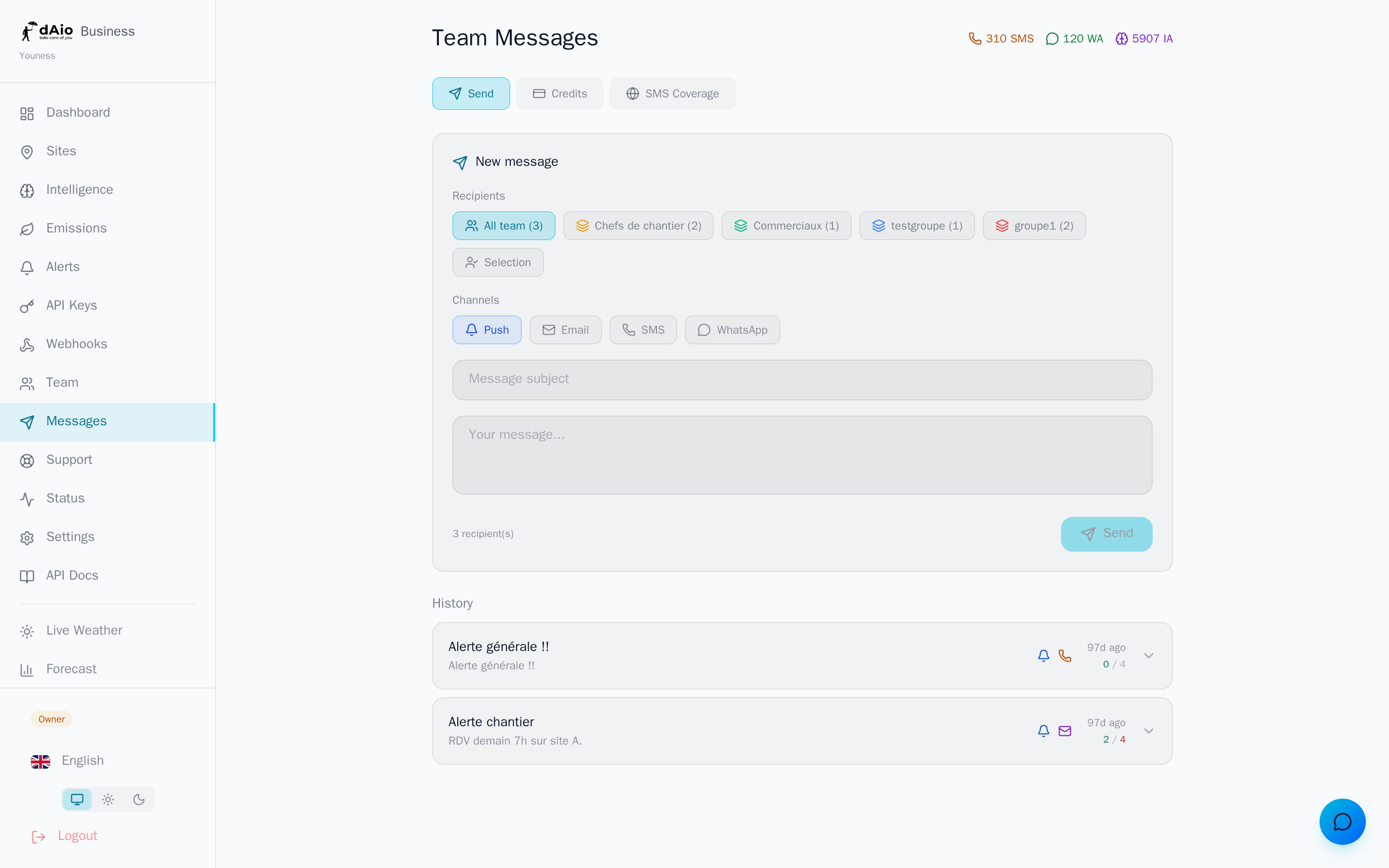
It all starts from the Messages tab in dAio Business, organised into three areas: Send (composition and history), Credits (your balances and bundle purchases) and Coverage (the countries reachable by SMS).
Tip: combine Push (free) for everyday convenience and SMS for critical instructions. A message sent across several channels maximises the chances that it will be seen in time.
Sending a message
From the Send tab, the composer fills in from top to bottom:
- Choose the recipients (the whole team, a group or a selection).
- Select one or more sending channels.
- Enter a subject and the body of the message.
- Check the summary (number of recipients, SMS/WhatsApp credits consumed).
- Click Send.
The message goes out simultaneously on every channel selected. The composer clears and the message immediately joins the history, where you track its delivery.
Warning: a message that has been sent cannot be recalled. Reread the subject and the body before clicking Send, especially when paid channels (SMS, WhatsApp) are active.
Choosing the recipients
Three targeting modes are available:
| Mode | Target |
|---|---|
| Whole team | All active members (invitation accepted) of your organisation |
| Group | A predefined team group (e.g. "Site managers"), with its member count |
| Selection | The members you tick individually |
The recipient counter updates in real time according to your choice. Only members who have accepted their invitation are counted.
Tip: create your groups ahead of time (by trade, by site, by team). You can then target the right audience in a single click, without re-ticking people for every send.
Choosing the channels
You can enable several channels for a single message; each one has its own cost and prerequisites.
| Channel | Cost | Prerequisites |
|---|---|---|
| Push | Included | dAio app installed on the member's phone |
| Included | Verified e-mail address | |
| SMS | 1 SMS credit / recipient | Verified phone number, in a covered country |
| 1 WhatsApp credit / recipient | Verified WhatsApp number |
The summary at the bottom of the composer shows the exact number of SMS and WhatsApp credits that will be debited — it is the number of recipients multiplied by the paid channels selected.
Info: Push and Email are always available at no extra cost. WhatsApp is reachable in every country; SMS depends on the coverage detailed below.
Credits and balances
The Credits tab shows your remaining balances for the three consumable resources:
- SMS — credits for sending by SMS.
- WhatsApp — credits for WhatsApp sends.
- AI — artificial-intelligence assistance credits.
Each balance distinguishes the credits included in your subscription (reset every month) from purchased credits (which never expire). A reminder of the balances is also shown at the top of the Messages page.
When a resource runs out, buy a bundle directly from this tab: select the volume you want, confirm, and complete the secure payment. Prices are shown excluding tax.
For details of the bundles, unit prices and billing, see Messages — credits.
Tip: keep an eye on your balances ahead of a risky weather episode. Buying a bundle in advance saves you from running out of SMS credits at the worst possible moment.
SMS coverage
The Coverage tab lists the countries reachable by SMS and those that are excluded (for reasons of cost or regulation). dAio compares this list with your members' numbers:
- If none of your members with a verified number is in a covered country, the SMS channel is disabled and a message tells you so.
- If only some members are outside coverage, dAio names them for you so that you favour another channel for them.
WhatsApp is not subject to these restrictions: it works in every country.
Warning: a number located in an excluded country will not receive the SMS, and no credit will be consumed for it. Plan on Push, Email or WhatsApp as a complement for those recipients.
History and delivery tracking
Below the composer, the history recaps every message sent: subject, body preview, channels used, send date and the delivered / expected-recipients ratio.
Expand a message to display its delivery detail: the target type, the sender, then the status line by line, per recipient and per channel.
| Status | Meaning |
|---|---|
| Sent | Message successfully handed off to the channel |
| Pending | Send being processed |
| Failed | Delivery error (invalid number, channel unavailable…); the reason is shown on hover |
Tip: in the event of a recurring Failed status for one person, check that their number or address is properly verified on the member record, then resend the message on another channel.
Best practices
- Be brief and explicit: a clear subject and a short body come across better in a Push notification and in SMS.
- Reserve SMS for critical instructions: it is paid and the most intrusive. For informational content, Push and Email are enough.
- Structure your groups to target the right audience without over-notifying the others.
- Anticipate your credits: keep a reserve of SMS/WhatsApp bundles ahead of risky periods (see Messages — credits).
- Check the coverage before relying on SMS for an international team.
- Review the history after every important send to confirm that everyone has indeed received the instruction.