
AI Assistant (Chat)
The dAio Business AI assistant answers your weather and operational questions in natural language, automatically drawing on the context of your sites. Instead of navigating between screens, ask your question as you would an industry expert: "Can we pour concrete tomorrow in Lyon?" and get a reasoned, decision-ready answer.
It's the ideal tool for a quick briefing before a meeting, a scheduling trade-off, or a field decision.
Tip: the assistant cross-references the weather, your industry and your active alerts. A single question often replaces several round-trips across the platform.
Access
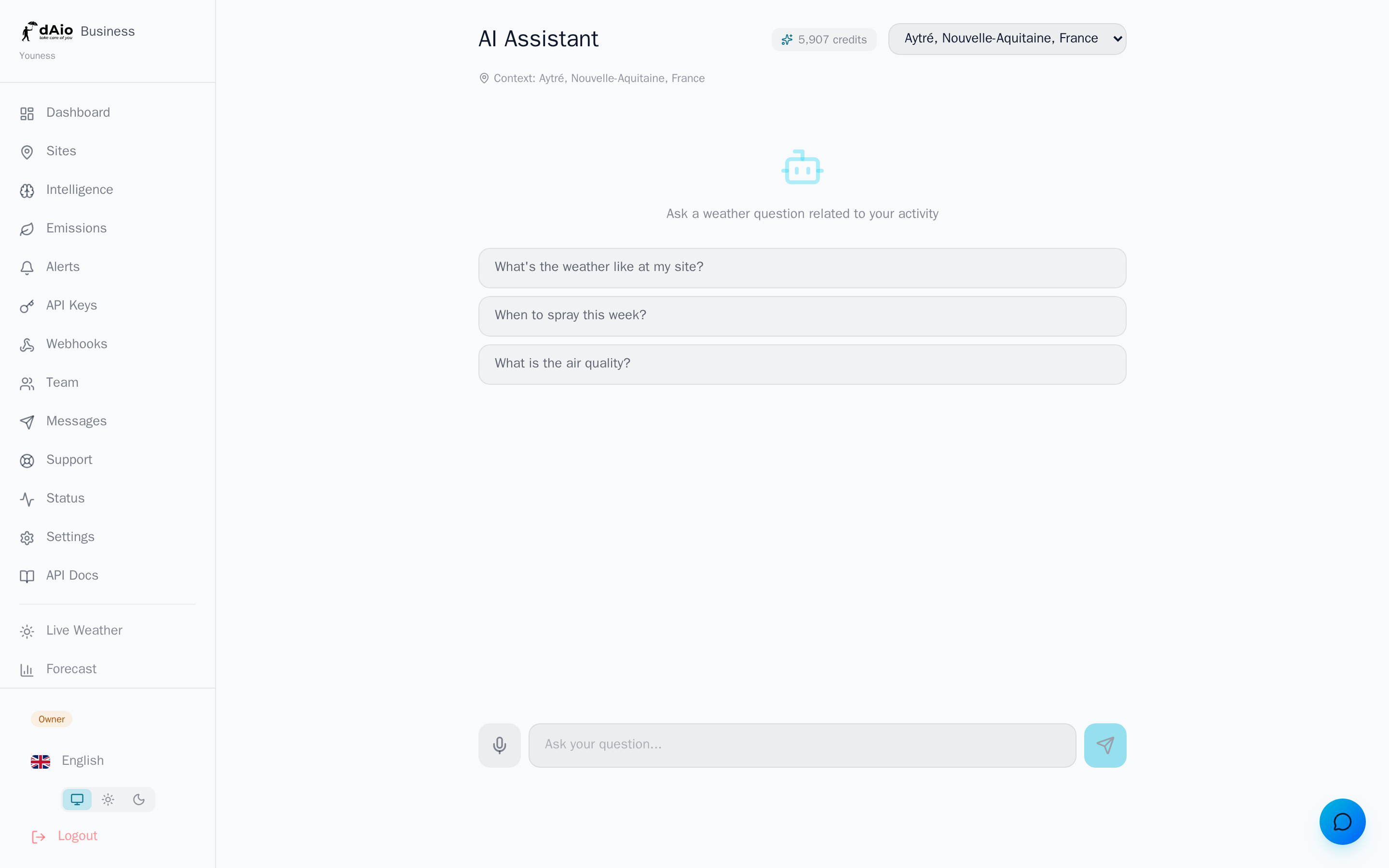
Click the Chat icon in the sidebar. The assistant opens on a welcome screen offering suggested questions so you can start right away.
Choosing the context site
The assistant always reasons relative to an active site, shown beneath the title with a location icon. If your organization has several sites, a selector appears at the top right: pick the relevant location before asking your question.
For that site, the assistant automatically knows:
| Context | Detail |
|---|---|
| Location | Exact coordinates of the selected site |
| Industry | Inherited from your organization (construction, agriculture, logistics…) |
| Weather forecast | Current and upcoming conditions for the site |
| Active alerts | Ongoing risks at the location |
You don't need to repeat this information in every message: the assistant factors it in on its own.
Asking a question
Type your question in the field at the bottom of the screen, then send it with Enter or the send button. Phrase your requests in natural language, as you would to a colleague:
- "What are the conditions for pouring concrete tomorrow?"
- "Is there a frost risk this week for my crops?"
- "What's the best window for a delivery on Thursday?"
- "Summarize the weather risks for the next three days."
The assistant keeps the thread of the conversation: you can chain follow-up questions ("And the day after?") without repeating the context.
Starter suggestions
On the welcome screen, three suggested questions appear to kick off the exchange. Click one to send it directly — handy for discovering what the assistant can do.
Voice dictation
When your browser supports it, a microphone button appears to the left of the input field.
- Click the microphone.
- Speak in your language.
- The text is transcribed into the field; review it, then send.
Tip: dictation is ideal in the field or on the move, when typing isn't practical.
Languages
The assistant understands and replies in 20 languages. It automatically matches your interface language: ask your question in English and get an answer in English; change the language in settings and the assistant follows.
Suggested actions
Some replies include an action button that takes you straight to the relevant screen — for example viewing the site's intelligence or managing your subscription. One click takes you from answer to action.
Credits and quota
Each exchange consumes AI credits. The remaining balance is shown at the top of the screen, next to a sparkles icon.
| Question type | Indicative cost |
|---|---|
| Simple question | ~1 credit |
| Complex question (in-depth analysis) | ~3 credits |
Your credit allowance depends on your subscription. When the quota is exhausted, the assistant lets you know and offers a button to upgrade; new exchanges resume when your quota renews.
Caution: keep an eye on your credit balance during heavy use. Once the quota is reached, the assistant stays unavailable until renewal or an upgrade.
Best practices
- Select the right site before asking your question: all of the assistant's reasoning depends on it.
- Be specific about timing ("tomorrow morning", "Thursday", "this week") for directly actionable answers.
- Chain follow-up questions rather than rephrasing everything: the assistant keeps the conversation context.
- Use the suggestions to discover use cases suited to your trade.
- Save credits for value-added analysis; for raw data, the site's intelligence is often faster.
Tip: combine the assistant with your alerts. When an alert fires, ask the assistant "What do you recommend in response to this alert?" to turn the signal into an action plan.