
16-Day Forecast
The forecast gives you a fine-grained weather view, day by day and hour by hour, for each of your sites over a 16-day horizon. It turns weather into a planning tool: knowing when to act, when to postpone, when to mobilise your teams. Combined with intelligence and alerts, it lets you anticipate rather than react.
Each site is analysed from its exact coordinates, for a forecast as close to the ground as possible.
Tip: don't read the weather in isolation. A rain forecast doesn't carry the same impact across every trade — always cross-reference it with the intelligence scores specific to your sector.
Access
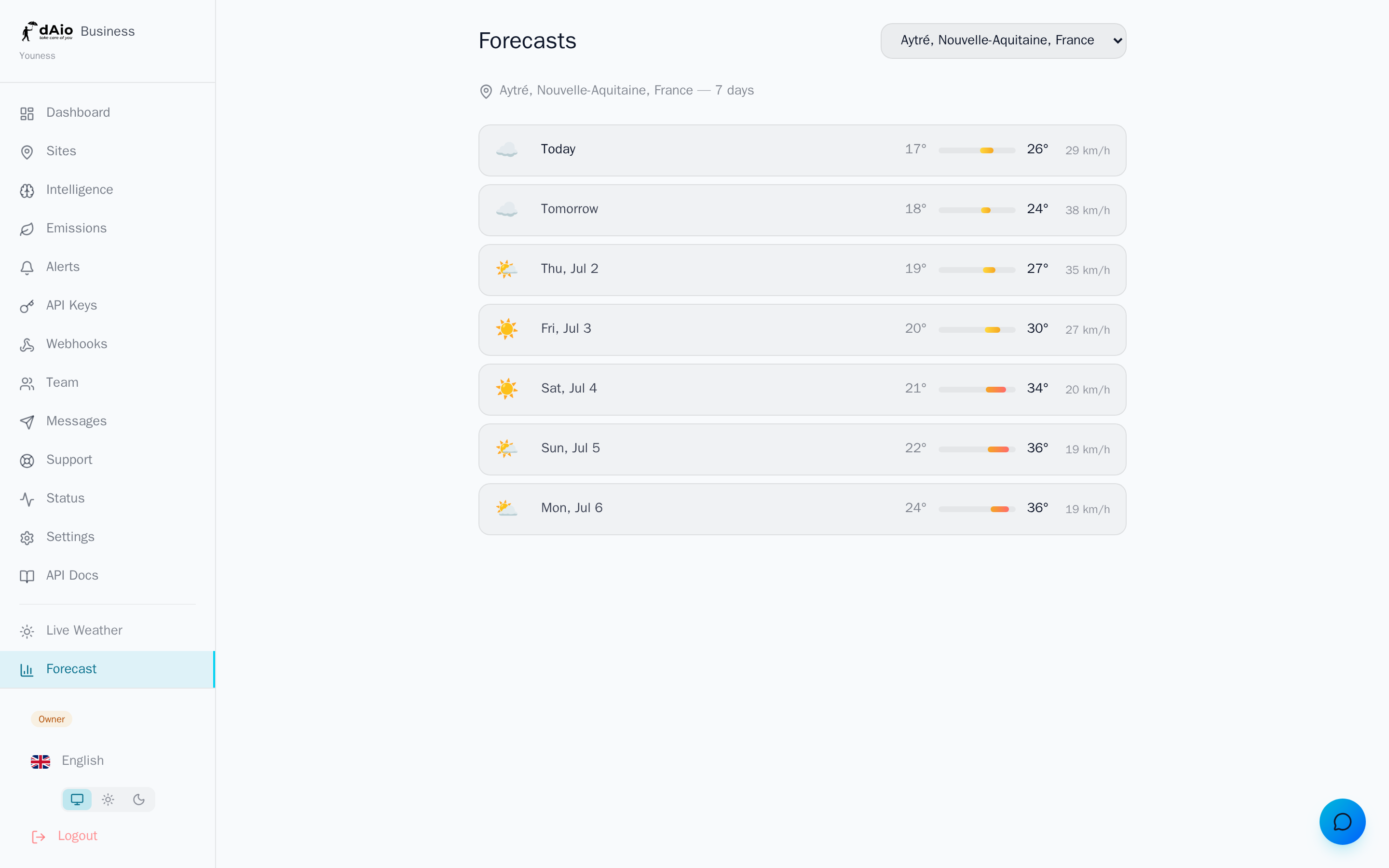
Open the Forecast page. If your organisation has several sites, select the one you're interested in from the dropdown in the top right. The site is shown below the title, along with the number of available days.
Daily view
The page displays a list of cards, one per day, from today ("Today") through to D+15. Each card sums up the essentials at a glance:
| Data | Description |
|---|---|
| Weather icon | Visual summary of the dominant conditions (sun, cloud, rain, storm, snow, fog) |
| Day label | "Today", "Tomorrow", then weekday and date |
| Min / max temperature | The day's range, with a coloured bar from cold (blue) to hot (red) |
| Precipitation | Expected total in millimetres, shown when rain is forecast |
| Wind | Maximum wind speed in km/h |
Tip: the coloured temperature bar reads in an instant. A band sliding toward blue signals a frost risk; toward red, a heat peak to anticipate for your field teams.
Day detail
Select a day to show its hour-by-hour evolution and sharpen your reading:
- Temperature and feels-like through the hours
- Wind evolution and direction
- Precipitation probability and intensity
- Cloud cover
This level of detail is invaluable for slotting an operation into the right time window: a "rainy" day may well offer a usable dry morning.
Reliability
A forecast's accuracy decreases with the horizon. Keep this benchmark in mind to calibrate your decisions:
| Horizon | Reliability | Recommended use |
|---|---|---|
| D+0 to D+2 | Very high | Firm decisions: interventions, safety, same-day logistics |
| D+3 to D+5 | High | Weekly planning, team organisation |
| D+6 to D+10 | Medium | Trends, scenarios to confirm |
| D+11 to D+16 | Indicative | General direction, to reassess each day |
Caution: never lock a critical decision on a forecast beyond D+5. Past that point, read the trend, not the exact value, and refresh each day as the deadline approaches.
Business use cases
- Plan interventions: schedule weather-sensitive operations (concrete, painting, lifting, treatments) within favourable windows.
- Keep teams safe: anticipate strong wind, frost, heatwaves or storms to adjust schedules and equipment.
- Optimise logistics: adjust deliveries and routes based on precipitation and traffic conditions.
- Decide on a postponement: decide ahead, on shared data, rather than in the morning rush.
Best practices
- Think by horizon: commit firmly in the short term, keep the medium term on watch, and revise each day.
- Cross-reference sources: combine forecast, sector intelligence and alerts for a complete decision.
- Check your coordinates: a forecast is only accurate if the site is correctly geolocated. A misplaced marker skews the whole reading.
- Drill down to the hour for sensitive operations: the daily view often hides usable windows.
- Share the reading: assign a referent per site so the right person receives and acts on the right forecast.
Tip: turn the forecast into action. Set up alerts on your critical thresholds to be notified automatically, without having to check the page every morning.